
Examining documentation and help systems since 2002
Contents
Special Reports
Reading Usable Help
@UsableHelp on Twitter
Gordon R. Meyer
Copyright 2002-2015
Favorite Sites
Grammar Girl's Quick and Dirty Tips for Better Writing

A temporary pause

I have been writing Usable Help for 12 years and 8 months. What a fantastic journey. However, just as I had to pause work here in order to write Smart Home Hacks, I now find myself needing to spend more time another new project. I will resume in the future, and in the meantime the archives are available if you haven't quite caught up. As always, thank you for reading, and for your patience. I can still be reached using the feedback form if you need to contact me.
Posted: March 9, 2015 link to this item, Tweet this item, respond to this item
Real help in real time
 Helpouts by Google leverages their Hangouts architecture to provide one-on-one real-time tutorials and assistance on a variety of topics. Instead of looking up an answer to your question--be it about cooking or Photoshop--you can simply ask someone. On-demand live assistance is part of the Kindle Fire tablet, but Amazon has been quiet about how its working out. Here, a broadly defined pay-per-use service could prove valuable for those who don't like to read.
Posted: January 18, 2015 link to this item, Tweet this item, respond to this item
Best-selling sofware manuals

Two of the best selling books in 2014 were software manuals. For a video game. I don't mean that they were the bestsellers compared to other manuals. They are solidly among the top twenty of all books published in 2014. An amazing accomplishment.
I do play video games, but I'm more of an old school kind of guy, so I've never tried Minecraft. These two books? They're user guides for Minecraft. Minecraft apparently has the right mix of elements to really engage with users, including a lack of built-in documentation. It's not a hinderance, it's a feature. Robin Sloan's The Secret of Minecraft spells it all out.
Posted: January 10, 2015 link to this item, Tweet this item, respond to this item
Engineering reductionism
It's said that every problem can be reduced to a flowchart. In fact, this is essential for the coming singularity. I always regarded this as hyperbole, but the lovely book Everything Explained Through Flowcharts demonstrates that, yes, it's possible. It's a fun treat for your creative instructional design muscles.
Posted: January 4, 2015 link to this item, Tweet this item, respond to this item
Death throes of relevancy
The design exploration (aka masturbation) "Out of the Box" that was done under the aegis of Samsung was supposed to result in a "simple yet effective solution for cell phone users who have difficulties learning to use their handset."
Any instructional designer working under today's conditions will immediately identify the problems with the proposed solution. But let me start you out with just one -- there is no product box into which this book would fit, and the expense of producing packaging to accomodate it would exceed the costs associated with those confused customers (assuming they actually exist in quantity).
I don't have a lot of respect for Samsung, but even I have to admit they probably got a very big chuckle (after the eye-rolling stopped) at this design.
Before you accuse me of taking a never-meant-to-be-serious design project to task, consider what this says about the future and appeal of printed documentation: It is for the inept and simple-minded, and must be digitally-supplemented to be useful. That's just a split-hair from completely anachronistic.
Posted: December 31, 2014 link to this item, Tweet this item, respond to this item
Standard reference for mobile doc development
Joe Welinske's Developing User Assistance for Mobile Apps has been revised and expanded. It was the first publication for practitioners to address how to deliver and develop content, and it remains the best. The new edition is available in several different formats, too.
See also: A Look at Developing User Assistance for Mobile Apps
Posted: November 24, 2014 link to this item, Tweet this item, respond to this item
Simplifying Armageddon
Michael Dobbs, writing Nuclear Option for Smithsonian magazine, describes the iconic "Football" valise carried by the President of the United States. The full contents of the bag are mysterious, but we do know that the secret codes and instructions for launching a nuclear attack are among them.
These instructions might be the most important technical documents in the entire world. In addition to being the one manual that you hope is never used, it seems that for many years the instructions were overwhelming if not situationally unusable. Dobbs writes:
A recurring complaint of presidents and military aides alike has been that the Football, which currently weighs around 45 pounds, contains too much documentation. President Jimmy Carter, who had qualified as a nuclear submarine commander, was aware that he would have only a few minutes to decide how to respond to a nuclear strike against the United States. Carter ordered that the war plans be drastically simplified. A former military aide to President Bill Clinton, Col. Buzz Patterson, would later describe the resulting pared-down set of choices as akin to a “Denny’s breakfast menu.” “It’s like picking one out of Column A and two out of Column B,” he told the History Channel.
Kudos to the unknown tech writers and designers who improved the documentation. Can you imagine what it must be like to have this assignment?!
Posted: October 19, 2014 link to this item, Tweet this item, respond to this item
So long, Macworld
After 30 years of publication, the venerable Macworld magazine will no longer produce a printed magazine. I'm inclined just to say they're out of business, but I'll defer to the publisher's statement that they will still be publishing, albeit it only on the web. I'm sad to see them go, and I'll remain proud of having written a couple of articles for them in years past.
In his final editorial, Jason Snell describes how their readers are vanguards, and that the decline of interest in a printed magazine is simply the way the world is turning. Despite being put out of a job by the announcement, Snell even manages to encourage readers to embrace the "monthly digital editions" that are now being offered. The rest of us, though, would simply call it a paywall.
Given this news, I found some delicious irony in one of the articles featured in their final, printed issue. The opening sentence is "There's no stopping change," and writer Chris Barylick continues on to offer this bit of advice to consultants and support professionals assisting their clients:
YouTube is your friend--especially when it comes to instructional videos. If your clients are worried about learning to use a new application, piece of hardware, or operating system version, odds are good that you can point them toward an instructional YouTube video, bookmark the video for easy access, and perhaps save a link to the desktop as well. The instructor in a video is always accessible (and may be feeling more patient than you are in the heat of the moment). Take advantage of these resources.
You know what else is always accessible and patient? The documentation that came with the product. It's also more likely to be correct and well-written. You know, just like Macworld magazine was.
Posted: October 12, 2014 link to this item, Tweet this item, respond to this item
Tiny tutorials
While in many ways Vine represents the worst in the erosion of attention spans and polish, it can also be an effective tool for visual demonstration. For a very interesting set of examples, look at these for Dispatch, a mail program for iPhone.
See also: Short Attention Span Microvideos
Posted: September 13, 2014 link to this item, Tweet this item, respond to this item
Why everything is OK
Andy Hertzfeld, one of the fathers of Macintosh, writes about how "OK" became the universal "go ahead and do this" interface language for modern computers. The reason might surprise you, or at least make you laugh. For a less amusing exercise, search your own work for "click OK" and ask yourself if your readers still need to be told to do that after more than 30 years.
Sadly, the "Huh?" button introduced more than a decade later in Apple Guide failed to catch on.
Posted: August 23, 2014 link to this item, Tweet this item, respond to this item
Not our job to make it easy
Mark Bernstein, writing Intuitive, argues that professional software doesn't always have to always make things intuitive because it makes things possible. It's a short, stimulating perspective by someone who does the real work. (Bernstein is the creator of Tinderbox, the software I've been using for over a dozen years to create this website.)
I generally agree with what Mark is stating, as not every tool should be reduced to the simplest, monkey-proof set of options. Easy and intuitive are fine goals and should almost always be measures of success, but that doesn't mean a product has to be intuitive for every type of user. It's OK for a tool to be written for people who know what they are doing and what they want to accomplish.
Documentation faces a similar challenge that is, perhaps, even more pronounced. It's very common for writers and reviewers to want the instructions written for "the grandmother who just bought her first computer," or the person who, apparently, has no motivation or reason to be using the software in the first place.
See also: The Lowest-Common Denominator Problem, Unintended Consequences of Good Documentation, and The Forgotten, Yet Passionate, Middle
Posted: July 20, 2014 link to this item, Tweet this item, respond to this item
How to make a design problem worse with documentation
About a year ago I wrote about my experience using an Energizer flashlight that would automatically turn itself off after a few seconds of use. The short version of the story is that it is caused by a demonstration mode that that is poorly described in the documentation. (Yes, a flashlight with documentation, go figure.)
Well, despite the problems, I really liked the "Light Fusion Technology" that the flashlight used, so I decided to buy another model in the same product line. The new model also had the same, crazy demo feature. But instead of a user guide, this time they affixed a sticker to the unit, apparently hoping to explain the reset procedure.
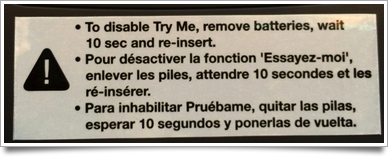
Unfortunately, the sticker is just as bad, if not worse, than the user manual was. While it is more discoverable for certain, the wording continues to obtusely refer to the problem and solution. So now you have a big, ugly, multi-lingual warning that tells you nothing about why the flashlight will not stay turned on.
By the way, this time I returned the flashlight to Amazon. As noted by other reviewers, the battery door is not affixed very securely, and I was put off by the fact that Energizer--a battery company of course--sells the light without a complete set of batteries. "Batteries Not Included," indeed.
Posted: June 15, 2014 link to this item, Tweet this item, respond to this item